
How It Works
RFID inventory counting, end to end.
From unboxing the Starter Kit to running your first count, and reconciling against the POS you already have.
Day One Setup
DIY setup, or add an RSG technician onsite.
The Starter Kit is portable hardware paired with cloud software. Plug in the printer, log into V-Prime, pair the handheld, and start tagging.
Unbox
Hardware arrives in 1–3 days. Reader, printer, label stock, power supplies, cables, everything in one shipment.
Connect & log in
Plug printer into the store PC or laptop, install the driver, load label stock and ribbon. Log into V-Prime with the credentials emailed by RSG.
Pair the handheld
Power the C8001, connect to store Wi-Fi, sign into V-Prime on the handheld. The reader is now linked to your account.
Onboarding call
An RSG implementation specialist walks you through the workflow on a screen share. Included with every kit.
Prefer hands on setup? Add on site setup for $1,995 per location. An RSG technician on the floor for a half day.
The Four Step Workflow
Encode, apply, count, reconcile.
Encode the labels.
The C8005 printer encodes a unique RFID identifier into each label as it prints. Use V-Prime to assign labels to SKUs, sizes, and other product attributes. One label per item, encoded inline with the printed barcode and product information.
Match the label format to the merchandise: apparel hangtags for clothing and accessories, adhesive UHF labels for cosmetics and packaged goods, jewelry tags for small high value items.
What you do
- Load blank label stock into the C8005 printer
- In V-Prime, select the SKU and quantity to encode
- Print & encode in one pass
- Each label is now uniquely tied to a product record
Apply the labels.
Apply the labels to merchandise as it's received from suppliers, or in bulk to existing stock when you start the program. Each item now carries a uniquely encoded RFID identifier the C8001 can read at a distance.
Receiving staff can label new inventory at the back of house station as it arrives, adding minutes to the receiving workflow, and removing hours from every count cycle that follows.

What you do
- Apply hangtag, adhesive, or jewelry tag to each item
- For new merchandise: label at receiving
- For existing stock: bulk label during a single tagging session
- Items are now ready to count
Count the floor.
Walk the sales floor and stockroom with the C8001. The reader picks up tags at distances up to 15 meters and group reads more than 200 tags per second. A full store count that previously took hours of manual scanning takes minutes.
Two staff members can count simultaneously with the second handheld add on, useful for larger stores or multi room counts on cycle days.
What you do
- Power on the C8001
- Walk the sales floor and stockroom systematically
- Reader streams reads to V-Prime in real time
- Most stores complete a full count in under 30 minutes
Reconcile against your POS.
V-Prime shows what's on the floor, what's missing, and what's misplaced, by SKU, by location, by department. Export the reconciliation report and compare it against the inventory totals in your existing POS, whether Shopify, Square, Lightspeed, or whatever you run.
No POS integration is required. V-Prime is built to operate alongside the systems you already trust, not to replace them.
What you do
- Open the count report in V-Prime
- Review missing, found, and misplaced items by location
- Export to CSV or PDF
- Reconcile against POS totals on your normal cadence
V-Prime Inventory Software
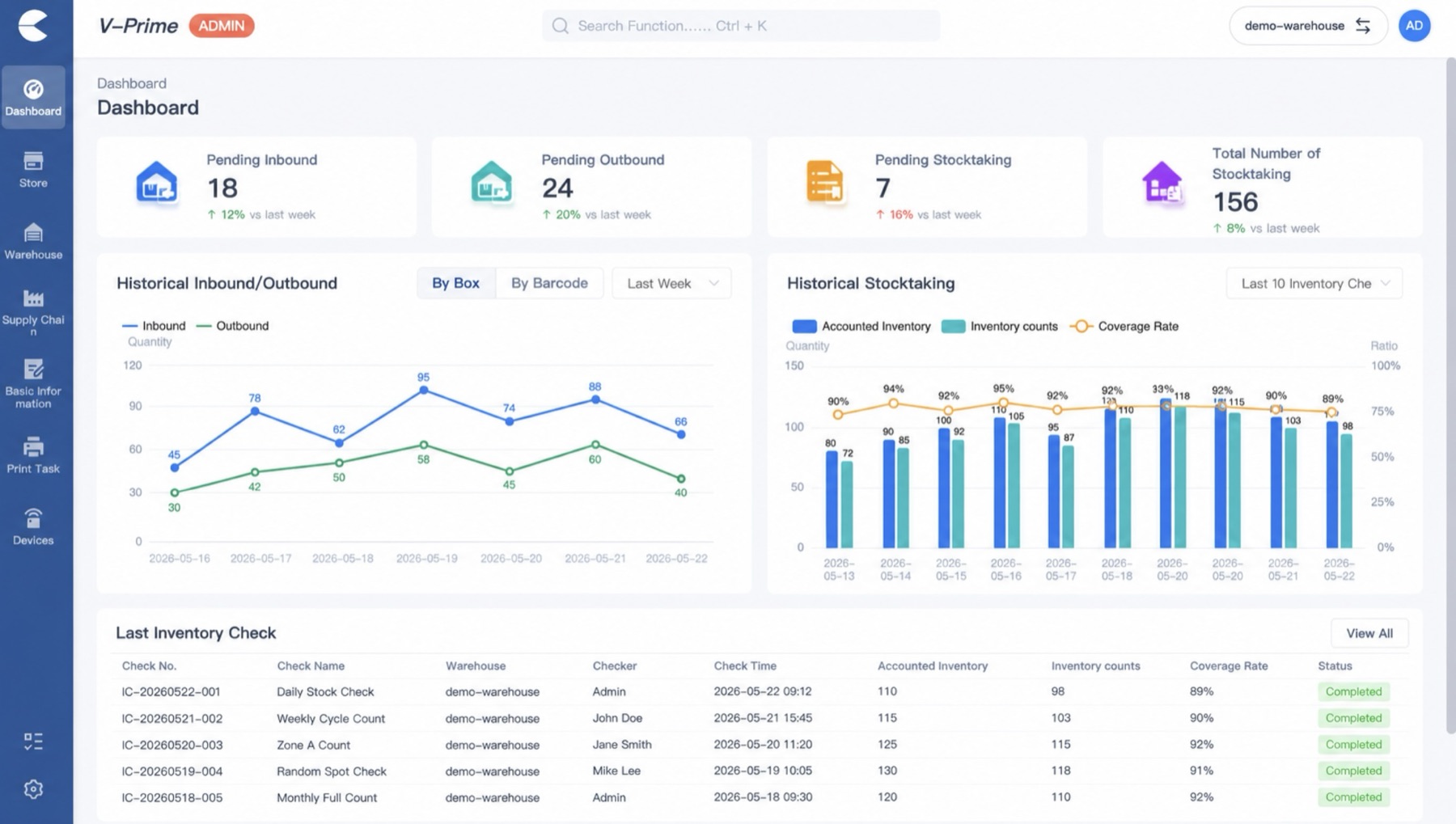
One dashboard for inbound, outbound, and on floor inventory.
V-Prime consolidates count results, location movements, and inventory analysis in a single web interface, accessible from any browser, on any device.
What You Don't Have to Do
No integration project. No new POS. Onsite installation optional.
- No POS integration. V-Prime runs standalone. Reconciliation is a manual export and compare against your existing system.
- No facility changes. No drilling, no antennas mounted at entrances, no cable runs. The C8001 is a portable handheld and the C8005 is a desktop printer.
- DIY setup, or add onsite installation. Every kit ships with a 30 minute onboarding call to walk through setup. RSG technicians are available onsite for retailers who prefer hands on installation.
- No staff retraining program. Tag application takes a few minutes to learn. Counting the floor is "walk and watch the screen." A 30 minute call gets the team running.
Ready to see it in your store?
Configure the Starter Kit, request a multi store consultation, or call RSG to talk through your specific workflow.