

How It Works
RFID inventory counting, end to end
From unboxing the Starter Kit to running your first count, and reconciling against the POS you already have.
Day One Setup
Choose the setup option that works best for you
The Starter Kit is portable hardware paired with cloud software. Self installation: we provide the equipment and guidance your team needs to complete the setup, on the timeline below. Professional onsite installation: an RSG technician installs and tests the system at your location.
Unbox
Reader, printer, label stock, power supplies, cables. Everything arrives in one shipment.
Connect & log in
Plug printer into the store PC or laptop, install the driver, load label stock and ribbon. Log into indexRFID at www.indexrfid.com with the credentials emailed by RSG.
Pair the handheld
Power the C8001, connect to store Wi-Fi, sign into the indexRFID app on the handheld. The reader is now linked to your account.
Onboarding call
An RSG implementation specialist walks you through the workflow on a screen share, including getting your catalog in: import it from a CSV file, or connect Shopify and it syncs in. Included with every kit.
Professional onsite installation is $1,995 per location. An RSG technician installs and tests the system at your location, on the floor for a half day.
The Four Step Workflow
Encode, apply, count, reconcile
Encode the labels
The C8001 handheld encodes a unique RFID identifier into each blank label, right from the indexRFID app. Pick the product on the screen, hold the label to the reader, and the tag is written and tied to that product record. No printer is required to tag goods.
For volume label runs, indexRFID drives the C8005 printer, printing and encoding label stock in one pass from the same receiving data. Match the label format to the merchandise: apparel hangtags for clothing and accessories, adhesive UHF labels for cosmetics and packaged goods, jewelry tags for small high value items.
What you do
- In the indexRFID app, select the product to encode
- Hold a blank label to the C8001 and write the tag
- For volume runs, indexRFID prints & encodes on the C8005 in one pass
- Each label is now uniquely tied to a product record
Apply the labels
Apply the labels to merchandise as it's received from suppliers, or in bulk to existing stock when you start the program. Each item now carries a uniquely encoded RFID identifier the C8001 can read at a distance.
Receiving staff can label new inventory at the back of house station as it arrives, adding minutes to the receiving workflow, and removing hours from every count cycle that follows.

What you do
- Apply hangtag, adhesive, or jewelry tag to each item
- For new merchandise: label at receiving
- For existing stock: bulk label during a single tagging session
- Items are now ready to count
Count the floor
Walk the sales floor and stockroom with the C8001. The reader picks up tags at distances up to 15 meters and group reads more than 200 tags per second. A full store count that previously took hours of manual scanning becomes a single walk of the floor.
Two staff members can count simultaneously with the second handheld add on, useful for larger stores or multi room counts on cycle days.
What you do
- Power on the C8001
- Walk the sales floor and stockroom systematically
- Counts submit to indexRFID from the handheld, and counts taken with no Wi-Fi upload when the connection returns
- A full count is one walk of the floor, not an item by item scan
Reconcile against your POS
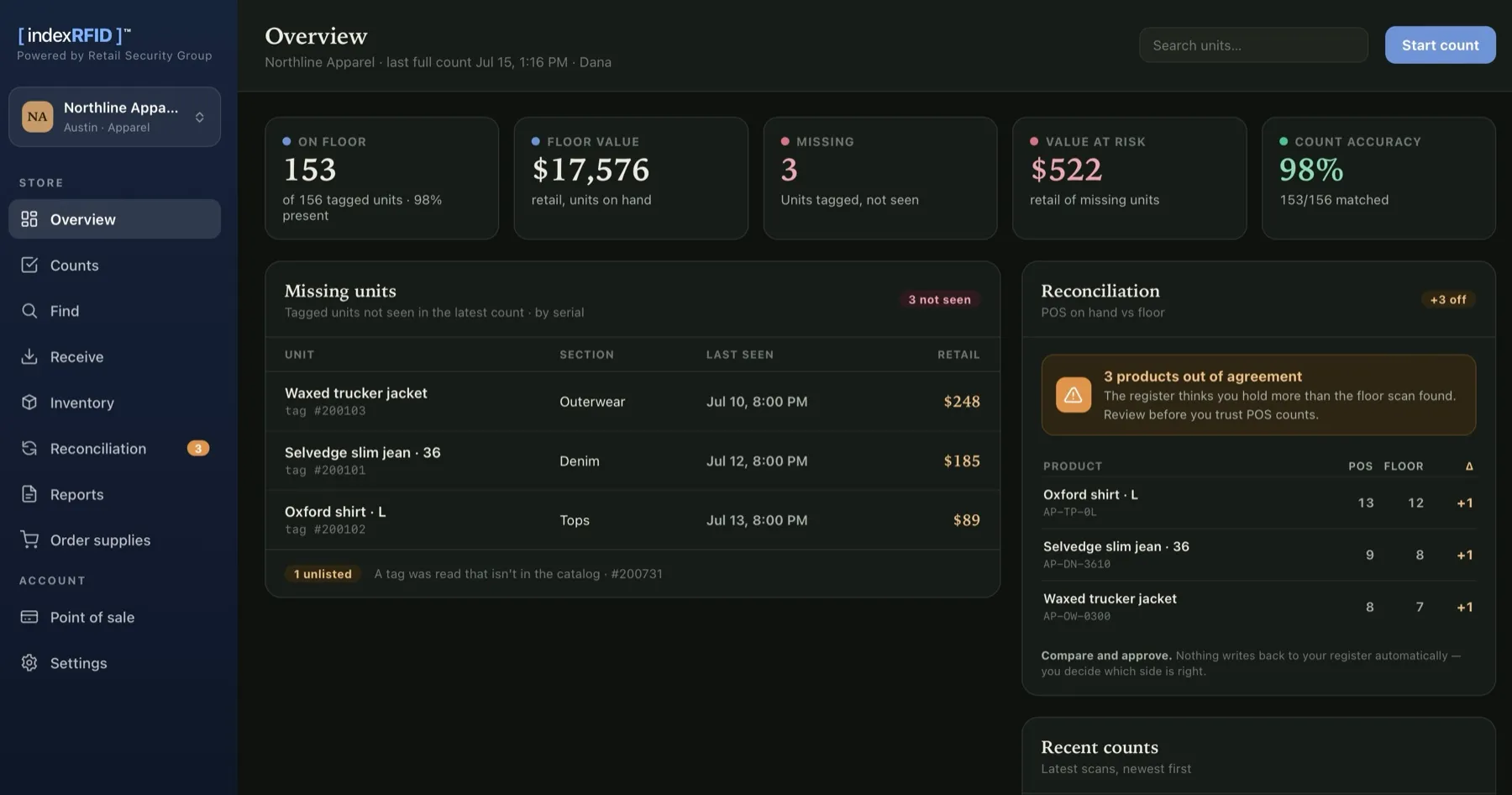
indexRFID shows what was counted, what's missing, and what's extra, item by item. Review the reconciliation report side by side with the inventory totals in your existing POS, whether Shopify, Square, Lightspeed, or whatever you run. Missing items can be marked sold or written off right from the count result, and products that fell below their par level are flagged for reorder.
POS integration is optional, never required. Connect a major platform like Shopify and indexRFID unlocks even more visibility: your on hand counts sync in, every product reconciles against the floor, and corrections you approve push back to your store. Prefer to keep things separate? indexRFID runs fully standalone, built to operate alongside the systems you already trust, not to replace them.
What you do
- Open the count report in the indexRFID portal
- Review counted, missing, and extra items
- Mark missing items sold or written off, item by item
- Reconcile against POS totals on your normal cadence
One dashboard for receiving, counting, and reconciliation
indexRFID consolidates count results, receiving activity, and reconciliation in a single web interface at www.indexrfid.com, accessible from any browser, on any device.
What You Don't Have to Do
No integration project, no new POS, your choice of setup
- No required POS integration. indexRFID runs standalone, with reconciliation as a side by side compare. Connecting Shopify is optional and unlocks synced counts and push back corrections.
- No facility changes. No drilling, no antennas mounted at entrances, no cable runs. The C8001 is a portable handheld and the C8005 is a desktop printer.
- Your choice of setup. Self installation with the included 30 minute onboarding call, or professional onsite installation where an RSG technician installs and tests the system at your location.
- No staff retraining program. Tag application takes a few minutes to learn. Counting the floor is "walk and watch the screen." A 30 minute call gets the team running.
Ready to see it in your store?
Configure the Starter Kit, request a multi store consultation, or call RSG to talk through your specific workflow.